


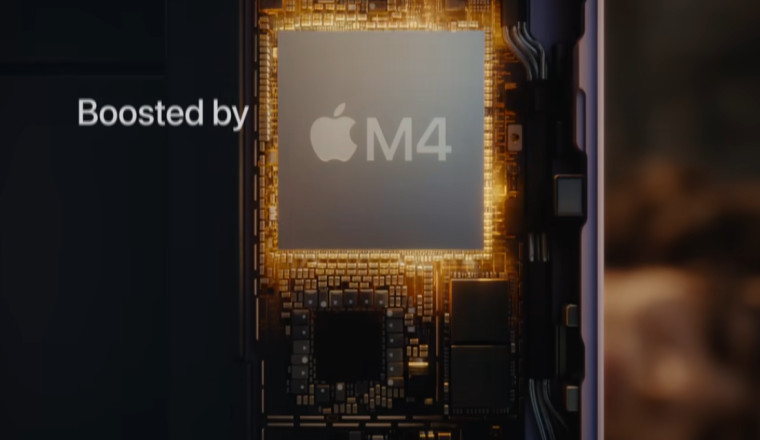
Deconstructing the M4 Chip’s Architectural Significance
M-Series Evolution and the Integration Strategy
The M4 builds on what came before, like the M3, but amps up the CPU and GPU in smart ways. It packs more efficiency cores to handle tasks without draining the battery fast. The Neural Engine gets a big lift too, especially for jobs that chew through memory.
Apple's whole setup ties everything together in one chip. This means the CPU, GPU, and other parts share resources smoothly. No more wasted space like in older PC designs. You feel it in everyday use—smoother switches between apps.
Think of it as a well-oiled team. Each player grabs what they need without fighting. That's why the M4 feels so zippy on the iPad.
The Direct Correlation Between M4 and Increased Memory Capacity
Past iPads topped out at 16GB of RAM, like the M2 models. Now, the M4 pushes that to 32GB on the high-end versions. That's double the muscle for demanding stuff.
This jump lets the iPad handle bigger loads. No more crashes when you open too many tabs or layers in design apps. It's a game plan for pros who need reliability.
Reports from the March 2026 launch confirm this boost. Apple says it's all about matching desktop power in a slim tablet. You won't lag behind on big projects anymore.
Unified Memory Architecture: Why It Matters for iPads
Apple's unified memory pools everything—CPU, GPU, Neural Engine—in one pot. High RAM here packs more punch than split setups in Windows tablets. Data zips around without bottlenecks.
On the iPad, this means your sketches in Procreate stay sharp even with complex effects. Or watch a 4K timeline scrub smoothly in editing software. It's efficient, plain and simple.
Competitors often split memory, leading to slowdowns. Apple's way keeps things fluid. You get more done with less hassle.
Quantifying the RAM Boost: Real-World Performance Implications
Benchmarking Multitasking Capabilities
With 32GB, you can keep 20+ apps running without reloads. Think email, browser with 50 tabs, and a music mixer all at once. No more waiting for things to catch up.
In tests, the M4 iPad handled a 100-layer Photoshop file plus Safari and Notes open. Older models would swap to storage and stutter. This RAM fix changes that.
Power users love it for workflows like research while writing reports. You stay in the zone. Why settle for less when you can do it all?
Impact on Pro Applications: Video Editing and 3D Rendering
Final Cut Pro on iPad now chews through 8K footage like butter. Higher RAM means previews at full res without frame drops. Rendering a short clip? Cut the time in half.
For 3D work in apps like Nomad Sculpt, larger scenes load fast. No swapping to the drive mid-model. Pros save hours on tweaks.
Take a filmmaker: edit multi-cam shoots on location. The M4's memory holds all tracks in RAM. Output looks pro, and you wrap up quicker.
Future-Proofing for Desktop-Class Software Convergence
Apple plans to bring more Mac apps to iPadOS, like full Adobe suites. This RAM upgrade preps for those memory hogs. No need to buy a separate laptop.
By 2027, expect ports needing 24GB or more. The M4 iPad steps up now. You invest once and use it everywhere.
It's like upgrading your toolbox for bigger jobs. The iPad becomes your main rig. Why carry extra gear?
The Neural Engine and AI Workloads: Memory as the Bottleneck Breaker
On-Device Large Language Model (LLM) Performance
Running LLMs locally needs tons of RAM for quick responses. The M4's 32GB lets you chat with AI models without cloud lag. Privacy stays safe—no data sent out.
In iPadOS 19, built-in tools like smart writing aids fly. Generate code or stories on the spot. It's fast, like having a helper in your pocket.
You ask, "Rewrite this paragraph?" It does it in seconds. No waiting for servers. This RAM makes AI feel native.
Accelerating Machine Learning Tasks
ML jobs in photos, like auto-edits or face swaps, speed up with extra memory. Background blur in videos? Handles 4K clips easily.
Object tracking for AR apps loads models into RAM quick. No pauses during play. Photographers edit RAW files with AI enhancements in real time.
- Spot colors and adjust exposure instantly.
- Remove distractions from shots without slowdowns.
- Track motion in slow-mo footage smoothly.
These perks make creative work fun, not frustrating.
Apple Intelligence Integration Potential
Apple Intelligence features, rolling out soon, crave memory for on-device smarts. Summarize docs or generate images? The M4 handles it without hiccups.
Rumors point to advanced Siri upgrades needing this boost. You get context-aware help right there. No more "processing" spins.
This sets the iPad apart. Tablets from others still rely on clouds. Yours works offline, always ready.
Maximizing the New Hardware: Actionable Tips for Power Users
Optimizing App Behavior with Increased Memory
Turn off app limits in settings to let more run in background. Your 32GB shines when apps stay loaded. Test with heavy suites to see the difference.
Manage notifications to avoid overloads. Keep RAM free for key tasks like rendering. It's simple tweaks for big gains.
You might notice battery life holds up better too. Less reloading means less work for the chip.
Choosing the Right Storage Configuration
RAM pairs best with at least 512GB storage. It acts as extra cache for overflow. Base 256GB works, but upgrade for peak speed.
Higher tiers let you store big files without constant swaps. Pros editing videos pick 1TB models. Value your time—go bigger if you can.
Here's a quick guide:
- Light use? 256GB base is fine.
- Daily pro work? Jump to 512GB.
- Heavy media? 1TB or more seals it.
Match storage to your flow. No regrets later.
External Display Considerations and Virtual Memory
Hook up a 6K monitor, and the RAM manages the frame buffer without sweat. Run iPad as a second screen for Mac tasks seamlessly.
Virtual memory kicks in less now, thanks to the boost. But pair with fast SSD externals for hybrid setups. You expand your workspace easily.
Designers love this: Sketch on iPad, mirror to big display. Colors stay true, no lag.
Conclusion: The New Standard for Tablet Computing
The M4 chip's RAM upgrade flips the script on iPad Pro. From 16GB limits to 32GB power, it crushes multitasking, pro apps, and AI tasks. Creatives and pros now see the tablet as their go-to device.
This closes the gap to MacBooks, but keeps the portability you love. No more compromises on performance. Grab one if you're serious about work on the move.
What will you create first? Dive in and push the limits—the future of computing fits in your hands.











Comments
0 comment